

By Rebellions Engineering
For the longest time in the datacenter, when it came to scale out networking, the rule of thumb was “switch when you can, route when you must.” This architectural choice was determined in part by the relative costs of switches and routers, but also by the desire to reduce complexity in the network.
With modern GenAI architectures, where AI clusters can span multiple geographically distributed datacenters, the pendulum is swinging back to the early days of the commercial Internet, when the rule was “route when you can, switch when you must.” And even when there are switch fabrics interlinking nodes to share distributed, parallel workloads, everyone wants to eliminate layers in the switch interconnects to reduce the number of hops between compute engines on those interconnects to cut down on the latency between those engines.
That is because AI workloads – particularly GenAI inference – and the people driving them are very sensitive to latency. No one and no program wants to wait for anything anymore. Agentic AI workloads are so complex and intertwined that Amdahl’s law – a system is only as fast as its slowest component – predominates, and slowing down clusters loaded up with very expensive (general purpose GPUs) or relatively expensive vector and matrix accelerators dedicated (XPUs) means a tremendous amount of capital investment is not giving the return on that investment that the C-suite is demanding.
This is why the hierarchy of interconnects in a system is so important, which was discussed in a prior blog post. But given the ever-changing nature of GenAI models and the need to support many different models on any given AI cluster, the topology of networks interconnecting systems into a cluster for scaling out GenAI inference workloads is just as important as the latency and bandwidth feeds and speeds.
With systems built from our Rebel 100 and Rebel 100s accelerators, Rebellions AI gives GenAI customers the kinds of network topology choices that have been developed for traditional HPC simulation and modeling workloads over the years – topological choices that are not always available for systems based on Nvidia and AMD GPUs. This choice is a clear differentiator, allowing for topologies to be fit to models rather than using a one shape fits all approach. And importantly, these topologies are implemented with the on-package routers on the Rebel 100s accelerator and do not require external switches.
The contrast with Nvidia’s nodescale and rackscale systems with its current “Hopper” and “Blackwell” and impending “Rubin” systems. In both cases, customers have to buy NVSwitch interconnects, which link the GPU main memories to each other in a coherent fashion so the GPUs can share data and work. The NVLink ports on the Hopper GPUs have 900 GB/sec of bandwidth and on the Blackwell GPUs double that up to 1.8 TB/sec, which is a lot of bandwidth to be sure, and the latency is very low, too, at an estimated 500 nanoseconds. (Nvidia does not release latency figures for its NVSwitch devices.) But when you use NVSwitch to create node or rack systems, you have precisely one topology: All to All. That’s it.
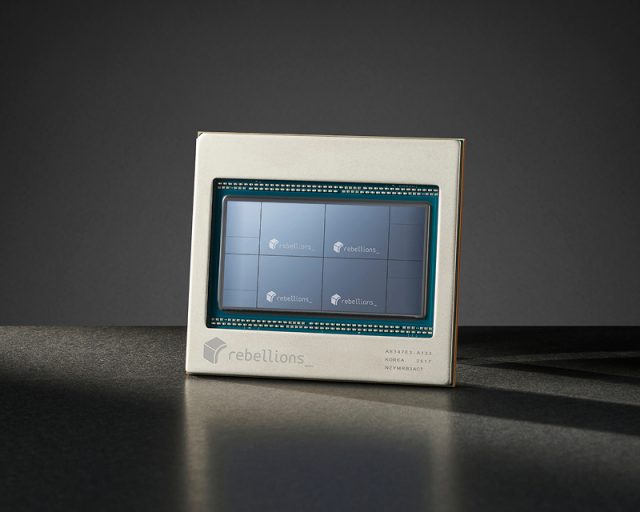
With the Rebel 100 accelerator in the Rebel Quad configuration, with four chiplets in a single package, the UCIe-A 2D mesh interconnect can be extended to interlink up to 256 sockets into a shared memory system. The three UCIe-A ports on the Rebel 100 chiplet run at 1 TB/sec each, and in a Rebel Quad package, there are four of the aggregate UCIe-A ports left over to scale up the compute in a RebelServer system. (The other eight ports are used to interlink the chips in a tightly coupled shared memory package, also in a 2D mesh.) The latency between the Rebel Quad sockets chip sockets will depend on the distance between the devices. There are also two PCI-Express x16 ports with an aggregate of 256 GB/sec of bandwidth for those customers who want to use Ethernet scale out networks to lash machines together.
With the Rebel 100s accelerator, the integrated router we have built into the package has a latency of around 1 microsecond, and we are working on the software stack to get that down to on the order of 500 nanoseconds that NVSwitch reportedly has. This router provides an aggregate of 1.6 TB/sec of bandwidth between devices across eight Ethernet ports. Rebellions will soon be on par with Nvidia in terms of latency, and 200 GB/sec per port for Ethernet interconnect bandwidth is actually sufficient to be competitive with Nvidia on latency when it comes to real-world inference performance.
With the Rebel 100s, which is a Rebel100 socket with four Rebel Single compute chiplets with two integrated I/O chiplets in the package, the eight Ethernet ports across those two I/O chiplets can be used in a number of ways to link together accelerators with different topologies: dragonfly, 3D hypercube, and 6D hypercube. These are all familiar to the HPC crowd and have been borrowed by the AI crowd, as has happened with many technologies originally created by and for the HPC centers of the world.
Here are two of the topologies shown graphically:
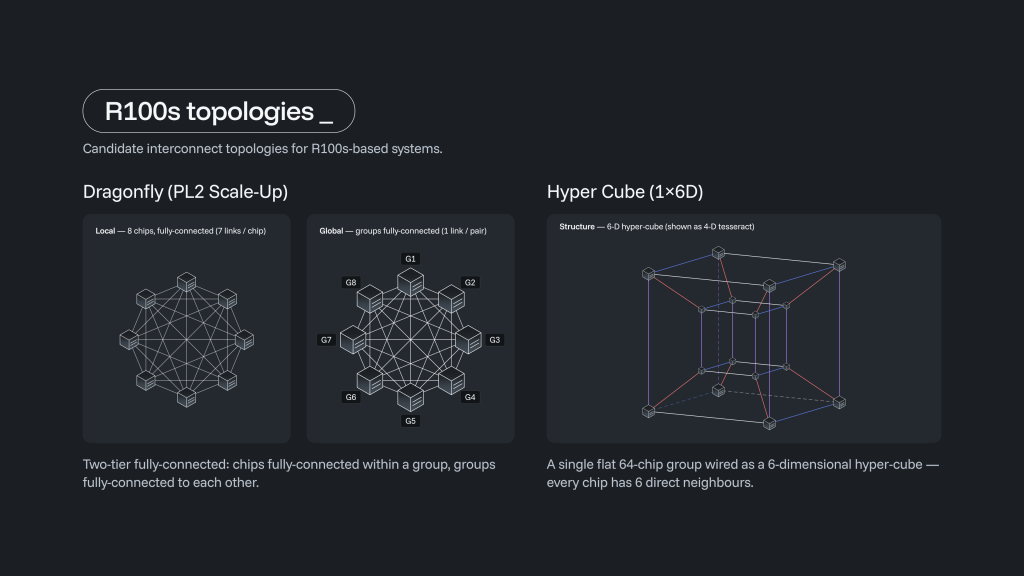
With the dragonfly interconnect, seven of the eight ports on each Rebel 100s package are used to interconnect eight sockets together. The remaining Ethernet port is used to interconnect eight eight-way groups together, for a total of 64 sockets in a single system image. It takes one or two hops to get from one XPU to another XPU with this topology.
With a 3D hypercube setup, shown below, Ethernet switches are introduced into the cluster:
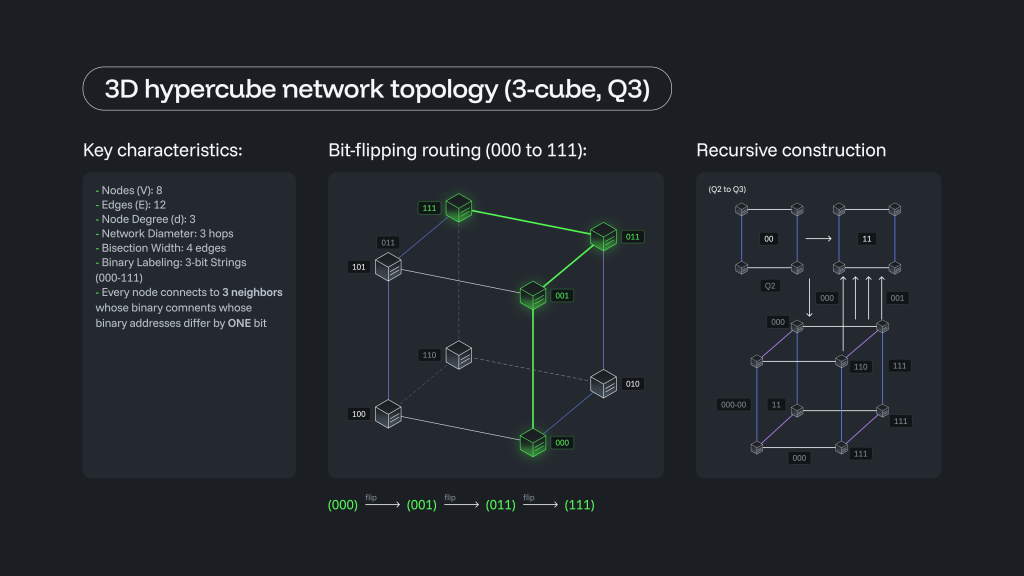
With the 3D hypercube, six ports are used to link four Rebel 100s devices into a group, and then the remaining ports are used to link eight devices to each other and then to reach out to switches that can be used to further scale the RebelServer domain. With eight sockets per cube and a total of eight cubes, you can interlink 64 sockets into a memory and compute domain. Again, some sockets require one hop to get to another socket, others take two or three hops, and the different latencies as well as the architecture of the GenAI model both have an effect on performance.
You can also use a 6D hypercube (also called a hexeract) topology to link 64 sockets together, which has eight times the bi-sectional bandwidth of the 3D hypercube topology:
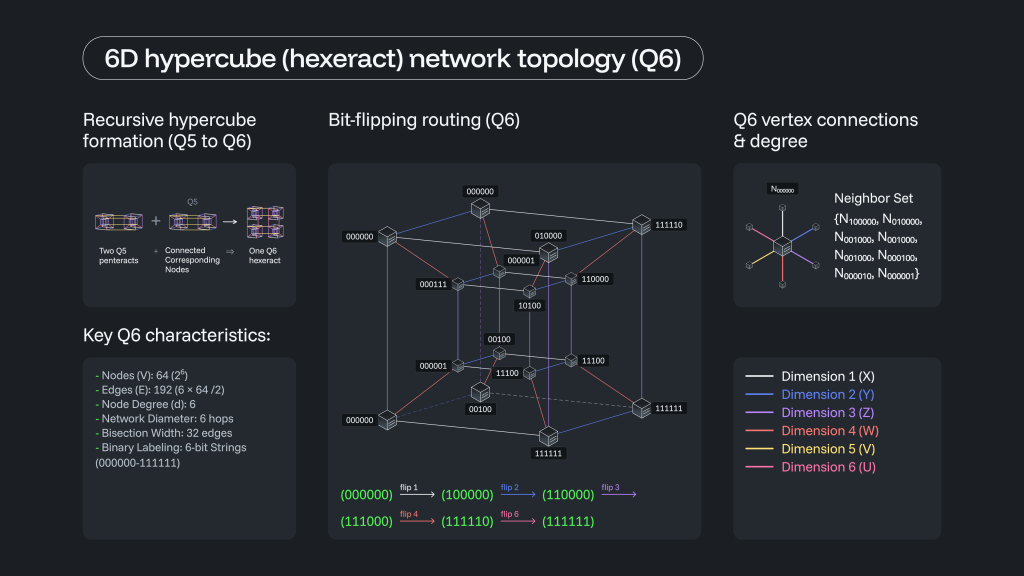
The bi-section bandwidth is higher with the 6D hypercube, but it can take as many as six hops to get from one socket to another one. The 6D hypercube interconnect also requires external switches only to scale out beyond 64 sockets.
There are always tradeoffs with any topology. The trick is to be able to choose the topology that maps best to the workload. To illustrate this, we have tested a bunch of different topologies, with switches and without them, to show how topology affects both throughput and interactivity on inference workloads.
Here are the feeds and speeds of the networks and their topologies used in the test:
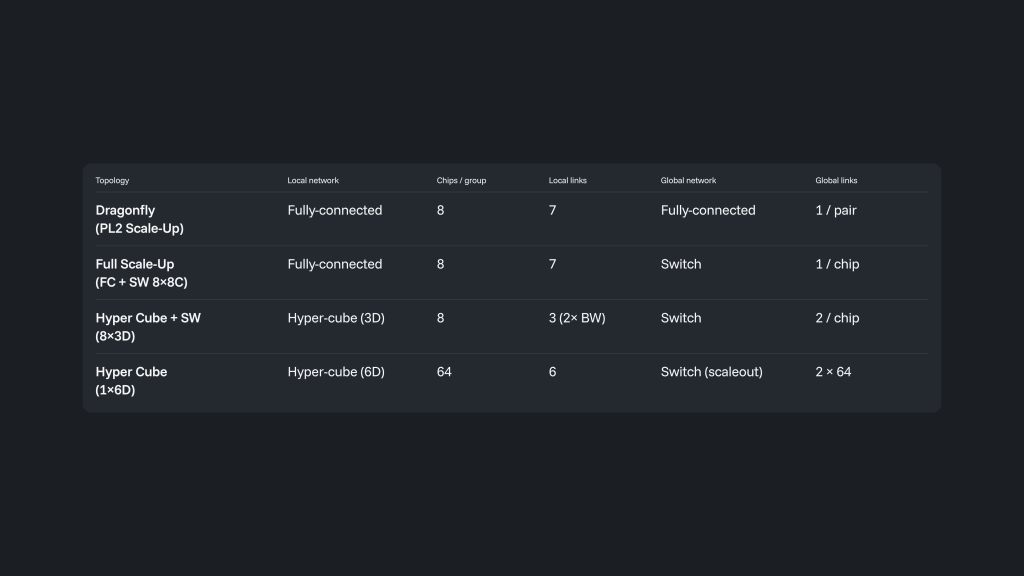
The benchmarks that we ran were for a mixture of experts model with 3 trillion parameters and multi-head latent attention, which compresses the KV cache used for inference workloads to boost throughput and make better use of the 144 GB of HBM3E memory, with 4.8 TB/sec of bandwidth, on the Rebel 100s chip. This is particularly important because the decode portion of the AI inference workload – where tokens are being generated as a response to an input or a query – is very sensitive to memory bandwidth.
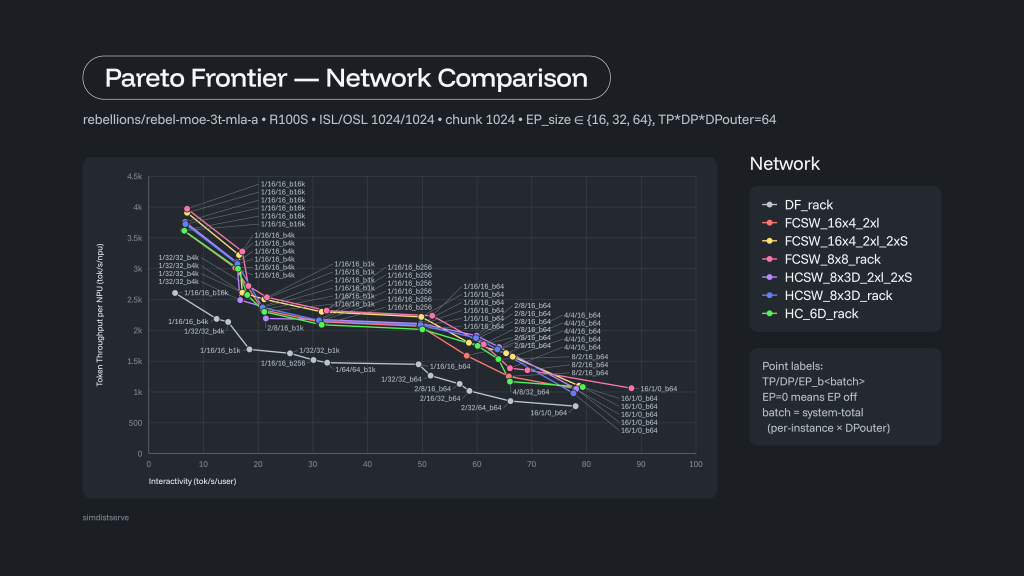
The different levels of tensor parallelism, data parallelism, and expert parallelism are shown for the pareto curve for each network topology and hardware configuration to support it. This particular model uses FP4-quantized weights, requiring 1,566 GB of storage for the model weights, which is a minimum of 10.9 Rebel 100s accelerators, and therefore the test has a minimum data parallelism of 16 XPUs.
The switchless dragonfly interconnect provides a baseline of performance, as you can see. But you can push the performance up by as much as 52.4 percent by having switches in the mix to interlink 64 Rebel 100s accelerators. The interactivity also can be pushed up by as much as 47.6 percent alongside that throughput increase. If you need more throughput than the dragonfly topology has, you can opt for the 6D hypercube configuration, and that will be in the hunt with the topologies that have Ethernet switches scaling them up and out.
But the point is this: You don’t have to use external Ethernet switches to create a 64 device rack. If you don’t want to have switches in your AI clusters, you can use the dragonfly or 6D hypercube interconnects and save significant money on capital expense as well as on power and space by forgoing switches, and in your environment, that may drive down the cost per token.
Which is the entire game right now with AI inference when all is said and done.




Share This: